
What Is an Opera Advertisement Blocker?
An Opera Advertisement Blocker is a browser-based feature designed to prevent many unwanted advertisements from appearing on websites.
Unlike installing a separate browser extension, Opera provides ad-blocking functionality directly within the browser. Users can access the relevant privacy and security settings and enable the feature according to their browsing preferences.
An Opera advertisement blocker can help reduce common advertising formats such as:
- Banner advertisements
- Pop-up advertisements
- Pop-under advertisements
- Some tracking-related requests
- Distracting page elements
- Certain advertising scripts
The exact content blocked can vary depending on the website, advertising technology, and Opera’s filtering rules.
For advertisers and publishers, understanding ad blocking is equally important because blocked advertisements can affect visibility, engagement, and campaign performance. Concepts such as programmatic advertising help explain how digital ads are delivered across websites.
Why Use an Opera Advertisement Blocker?
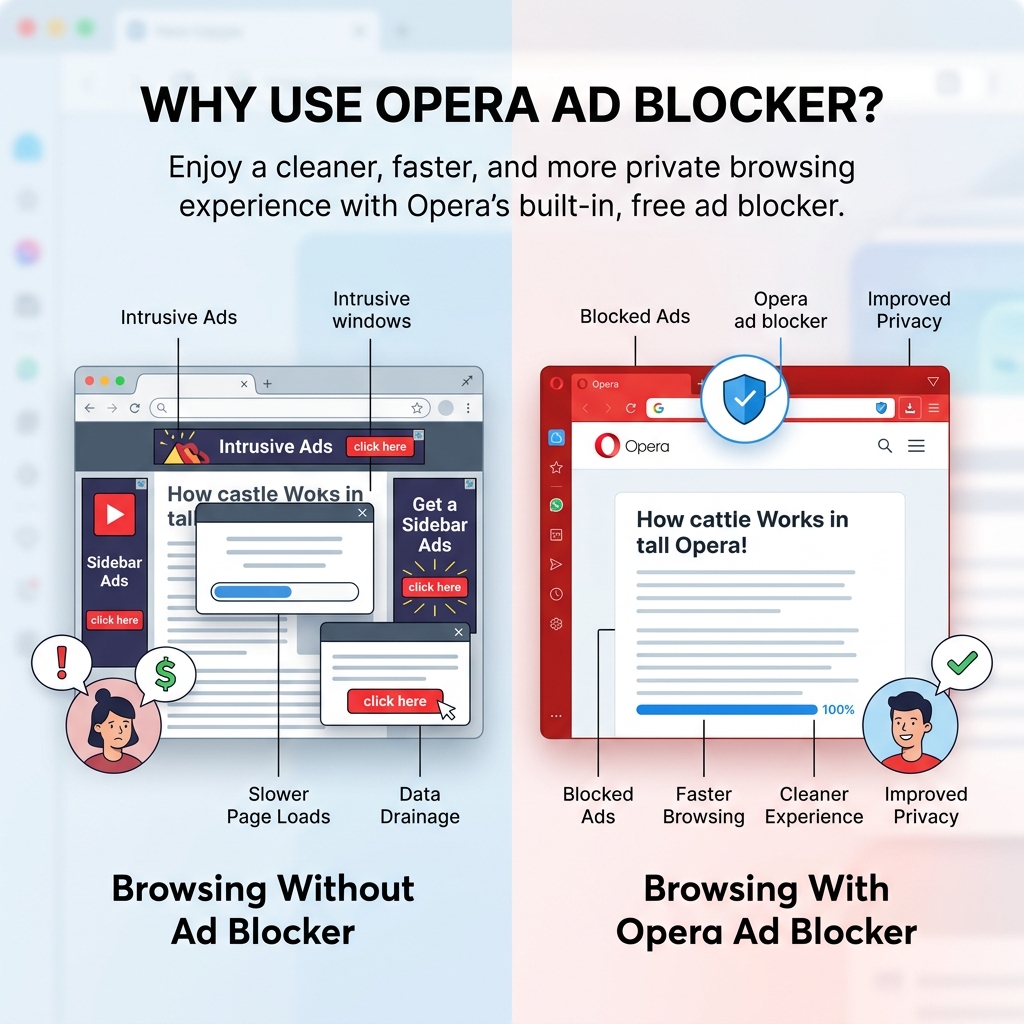
Web pages can contain numerous advertising elements. While advertising supports many free websites, excessive advertising can make browsing frustrating.
An Opera Advertisement Blocker can help create a cleaner browsing environment.
1. Reduce Distractions
Large banners, pop-ups, and automatically displayed advertisements can distract users from the main content.
Blocking some of these elements allows users to focus more easily on articles, videos, product information, and other page content.
2. Improve Browsing Experience
A page with fewer advertisements may feel less cluttered.
Instead of navigating through multiple promotional elements before reaching the content, users may have a simpler experience.
3. Potentially Improve Loading Performance
Some advertisements require additional scripts, images, and network requests.
When certain advertising resources are blocked, a page may require fewer resources to load. However, the actual improvement depends on the website, device, network, and amount of advertising present.
4. Reduce Unwanted Pop-Ups
Pop-ups can interrupt browsing and make websites difficult to use.
An advertisement blocker can prevent some unwanted advertising-related pop-ups from appearing.
5. Provide More Control
An ad-blocking feature gives users greater control over the type of browsing experience they want.
How Does Opera Advertisement Blocker Work?
An Opera Advertisement Blocker generally works by identifying advertising-related resources and preventing them from loading or displaying.
When you visit a website, the browser processes different resources, including:
- HTML
- Images
- JavaScript
- CSS
- Tracking requests
- Advertising scripts
The browser’s filtering system can recognize certain advertising resources and prevent eligible content from being loaded.
This means the browser may stop an advertisement before it becomes visible on the page.
However, an advertisement blocker cannot necessarily identify every advertisement.
Some websites use advertising systems that are difficult to distinguish from normal website content. Other websites may deliver advertisements dynamically or use first-party systems.
Therefore, enabling the Opera advertisement blocker does not necessarily mean every advertisement on every website will disappear.
How to Enable Opera Advertisement Blocker
The basic process is straightforward.
Step 1: Open Opera
Launch the Opera browser on your computer or supported device.
Step 2: Open Settings
Open Opera’s settings menu and look for the privacy or security-related options.
Step 3: Find Ad Blocking
Locate the built-in ad-blocking option.
Step 4: Enable the Feature
Turn on the advertisement-blocking feature.
Once enabled, Opera can begin applying its available filtering rules to websites you visit.
For the latest browser features and official information, visit the Opera Official Website.
How to Check Whether Opera Advertisement Blocker Is Working
After enabling the feature, visit a website that normally contains advertising.
You may notice:
- Fewer banner advertisements
- Reduced pop-ups
- Fewer advertising elements
- Cleaner page layouts
- Less visual clutter
However, testing should be done across several websites because different sites use different advertising technologies.
If an advertisement continues to appear, it does not necessarily mean the blocker is broken. The advertisement may use a delivery method that is not currently blocked.
What Can Opera Advertisement Blocker Block?
An Opera Advertisement Blocker may help block various types of advertising content.
Banner Ads
Banner advertisements are among the most common forms of online advertising.
They can appear:
- At the top of pages
- Between paragraphs
- In sidebars
- At the bottom of websites
Pop-Up Ads
Pop-up advertising opens additional windows or overlays.
These advertisements can be particularly disruptive because they interrupt the user’s browsing session.
Pop-Under Ads
Pop-under advertisements may open behind the current browser window.
Users may not notice them immediately but can discover additional tabs or windows later.
Advertising Scripts
Some advertisements rely on scripts to dynamically load content.
Depending on the filtering rules, certain advertising-related scripts may be blocked.
Opera Advertisement Blocker vs Browser Extensions
One important advantage of Opera’s built-in functionality is convenience.
With a browser extension, users generally need to:
- Find an extension
- Install it
- Grant permissions
- Configure its settings
- Maintain the extension
With Opera’s built-in advertisement blocker, the functionality is integrated directly into the browser.
Built-In Blocker
Advantages:
- No separate installation
- Simple setup
- Integrated browser experience
- Convenient for everyday browsing
Third-Party Extension
Advantages:
- Potentially more customization
- Additional filtering options
- Different filtering lists
- More advanced controls
Which approach is better depends on the user’s requirements.
For most users who simply want basic advertisement blocking, Opera’s built-in feature can be a convenient starting point.
Why Are Some Ads Still Showing?
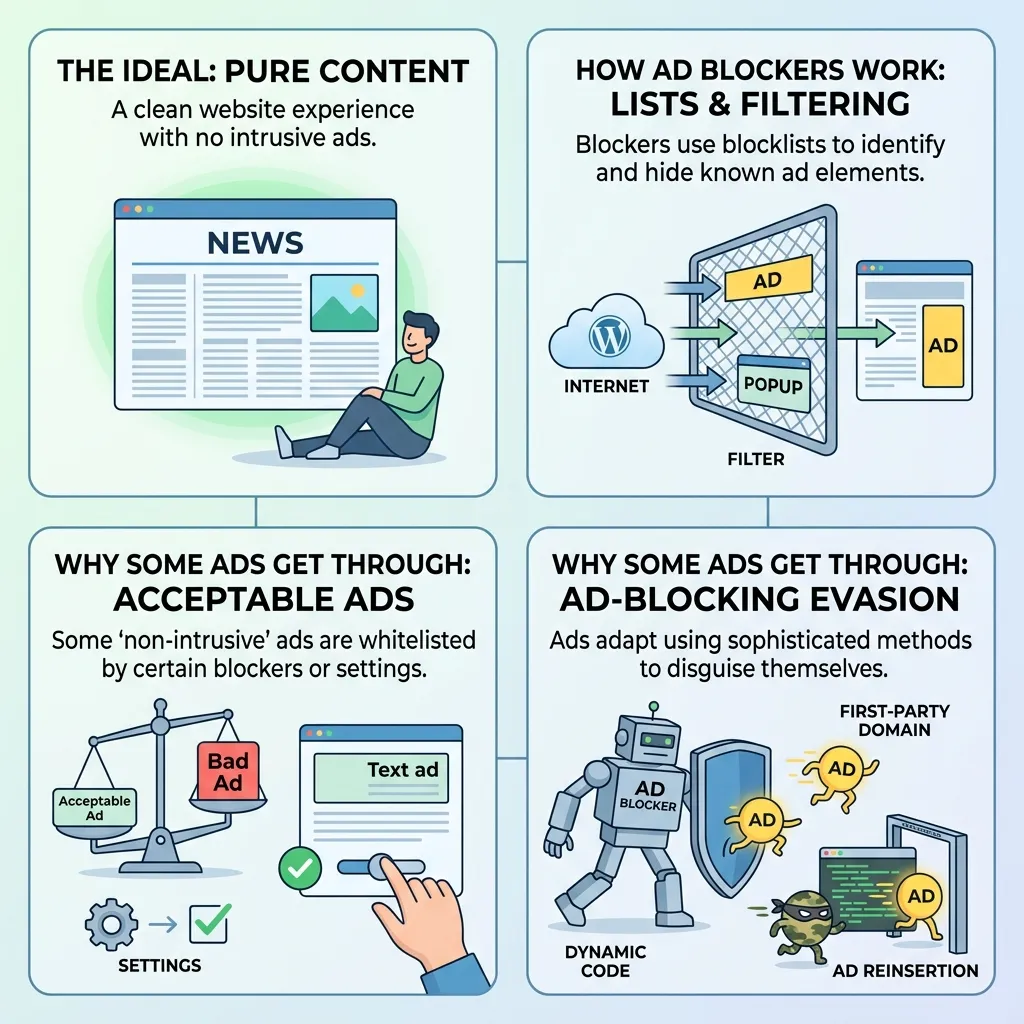
Even after enabling an Opera Advertisement Blocker, you may still encounter advertisements.
There are several possible reasons.
First-Party Advertising
Some websites serve advertisements through their own infrastructure.
Because the advertising content may be closely integrated with the website itself, it can be more difficult to distinguish from normal content.
New Advertising Techniques
Advertising technology continuously evolves.
Advertisers and publishers may develop new methods of delivering promotional content that are not immediately covered by existing filtering rules.
Sponsored Content
Some sponsored articles, recommendations, or promoted content may appear similar to normal editorial content.
These may not behave like traditional banner advertisements.
Website-Specific Behavior
Different websites implement advertising differently.
Therefore, a blocker may work extremely well on one website while allowing some advertising elements on another.
How to Troubleshoot Opera Advertisement Blocker
If advertisements continue appearing, try several basic troubleshooting steps.
Check Whether the Feature Is Enabled
The first step is confirming that Opera’s ad-blocking feature is actually turned on.
Restart the Browser
Close and reopen Opera after changing relevant settings.
Update Opera
An outdated browser may not provide the latest filtering improvements.
Test Multiple Websites
Check whether the issue occurs everywhere or only on one particular website.
Check for Extensions
Other browser extensions can affect how websites and advertisements are displayed.
Temporarily disabling unnecessary extensions can help identify conflicts.
Clear Browser Data
If a website continues displaying previously loaded advertising elements, clearing relevant browser data may help with troubleshooting.
Opera Advertisement Blocker and Privacy
Advertisement blocking and privacy are closely connected, but they are not exactly the same thing.
Online advertisements can involve different technologies, including:
- Cookies
- Tracking scripts
- Analytics systems
- Third-party requests
- Audience targeting
An advertisement blocker may prevent some advertising-related requests, but users should not assume that ad blocking provides complete online privacy.
Privacy involves broader practices such as:
- Browser settings
- Cookie controls
- Website permissions
- Tracking protection
- Account security
- Responsible browsing
For a broader discussion of advertising and privacy, read Privacy-First Advertising: Trust & Performance.
Does an Opera Advertisement Blocker Affect Websites?
Yes, blocking advertising resources can sometimes affect website functionality.
Some websites depend heavily on advertising revenue. Others may use advertising-related scripts for functionality beyond displaying advertisements.
As a result, blocking certain resources may occasionally cause:
- Empty spaces
- Missing page elements
- Layout changes
- Content that does not load correctly
- Requests to disable ad blocking
If a website does not function correctly, users may need to decide whether to temporarily allow advertising on that particular website.
Should You Disable Opera Advertisement Blocker?
There is no universal answer.
Users may choose to disable it when:
- A website requires advertising to be enabled
- A page does not function correctly
- They want to support a publisher
- Certain content is incorrectly blocked
On the other hand, users may keep it enabled when they prefer:
- Fewer advertisements
- Less visual clutter
- Fewer interruptions
- A cleaner browsing experience
The best choice depends on the user’s preferences and the website being visited.
Opera Advertisement Blocker for Different Users
For Students
Students researching online can benefit from fewer distractions when reading educational material.
For Professionals
Professionals who frequently browse research websites may prefer a cleaner interface without excessive advertising.
For Casual Users
Casual users may appreciate fewer pop-ups and promotional interruptions.
For Privacy-Conscious Users
Users concerned about tracking may combine advertisement blocking with broader privacy practices.
Opera Advertisement Blocker and Digital Advertising
Ad blocking is important not only for internet users but also for advertisers.
Digital advertising depends on reaching audiences in environments where advertisements can actually be displayed.
When users block ads, advertisers may experience reduced impressions.
This makes factors such as:
- Ad relevance
- User experience
- Privacy
- Page performance
- Creative quality
increasingly important.
Advertising that is overly intrusive may encourage users to adopt ad-blocking technologies.
This is why advertisers need to balance visibility with user experience.
To understand the psychological side of advertising, see How Advertising Affects Consumer Behavior.
Best Practices for Using Opera Advertisement Blocker
For a smoother browsing experience, follow these practices:
Keep Opera Updated
Browser updates can provide improvements to security, privacy, and functionality.
Review Website Behavior
If an important website does not work correctly, check whether advertisement blocking is affecting it.
Avoid Installing Unnecessary Extensions
Too many extensions can create conflicts and increase browser complexity.
Combine Ad Blocking With Privacy Practices
Advertisement blocking should be treated as one component of broader privacy protection.
Support Useful Websites
If you regularly use a website and want to support its content, consider allowing its advertisements when appropriate.
Opera Advertisement Blocker Checklist
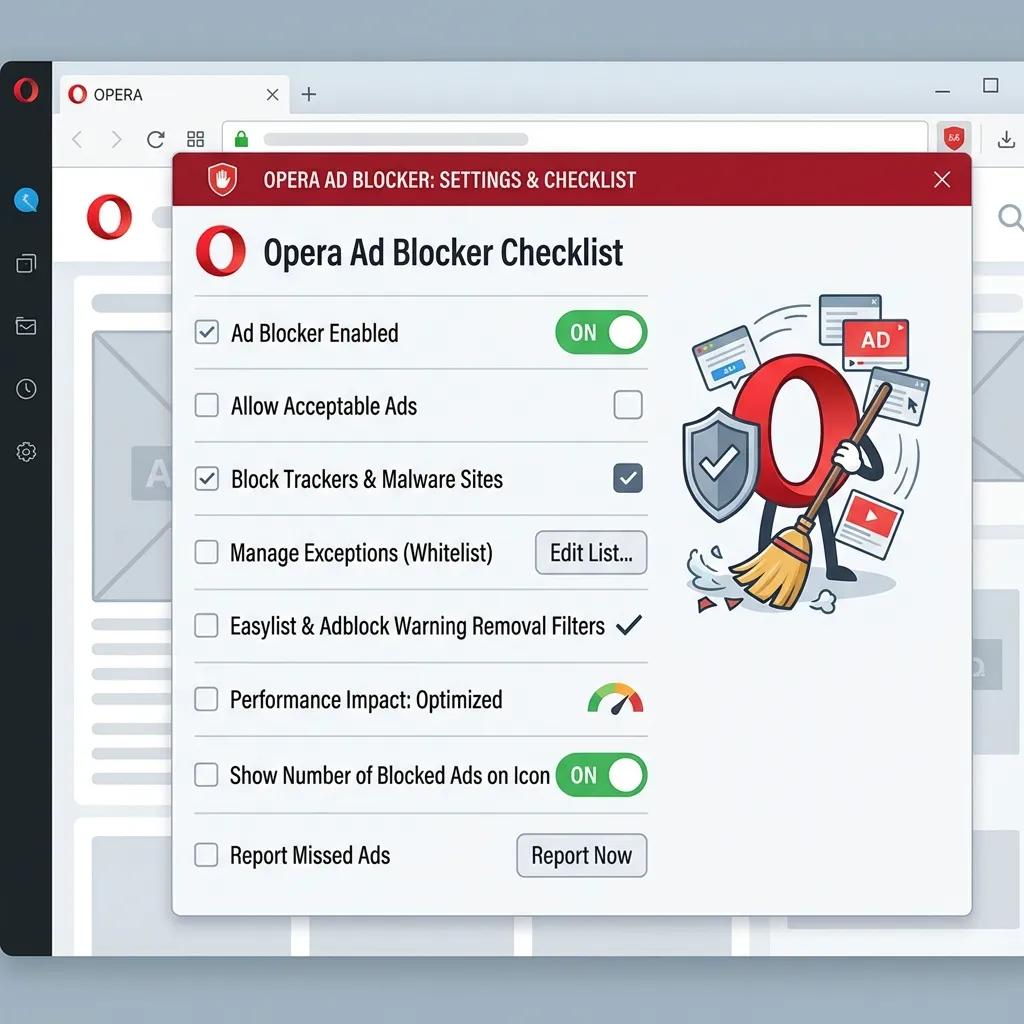
Before troubleshooting the blocker, check:
- Opera is updated
- Ad blocking is enabled
- The website has been refreshed
- Opera has been restarted
- Unnecessary extensions are disabled
- The issue occurs on multiple websites
- Browser data has been reviewed
- Website-specific settings have been checked
- Important websites are allowed when necessary
- Privacy settings have been reviewed
Conclusion
An Opera Advertisement Blocker provides a convenient way to reduce unwanted advertising while browsing the web. By blocking certain advertisements and advertising-related resources, it can make pages cleaner and potentially reduce distractions and unnecessary network activity.
However, no advertisement blocker can guarantee that every advertisement will disappear. Websites use different advertising technologies, and some promotional content can be closely integrated into the page itself.
For most users, Opera’s built-in ad-blocking functionality provides a simple starting point. Keeping the browser updated, reviewing website behavior, and combining ad blocking with broader privacy practices can create a better overall browsing experience.
For advertisers, the growth of ad blocking also highlights an important lesson: effective advertising should balance visibility, relevance, privacy, and user experience. When advertisements become excessively intrusive, users have more reasons to block them. When advertising respects the browsing experience, users are more likely to engage with it.
Frequently Asked Questions
1. What is Opera Advertisement Blocker?
Opera Advertisement Blocker is a built-in browser feature that helps prevent certain unwanted advertisements and advertising-related content from appearing on websites.
2. Does Opera have a built-in ad blocker?
Yes. Opera provides built-in advertisement-blocking functionality that users can manage through the browser’s settings.
3. How do I turn on Opera Advertisement Blocker?
Open Opera’s settings, locate the relevant privacy or ad-blocking controls, and enable the built-in advertisement-blocking feature.
4. Does Opera Advertisement Blocker block all ads?
No. It cannot guarantee that every advertisement on every website will be blocked. Some advertising formats may still appear.
5. Can Opera block pop-up advertisements?
Opera’s browser protections can help reduce certain unwanted pop-ups and advertising-related interruptions, although results can vary by website.
6. Does an Opera Advertisement Blocker improve browsing speed?
It can potentially reduce the resources required to load advertising content, but the actual performance improvement depends on the website and browsing environment.
7. Is Opera Advertisement Blocker the same as a privacy tool?
Not exactly. Ad blocking can support a cleaner and potentially more privacy-friendly browsing experience, but it is not a complete privacy solution.
8. Why are advertisements still appearing in Opera?
Some advertisements may use delivery methods or website integrations that are not blocked by the browser’s current filtering rules.
9. Can an ad blocker break websites?
Yes. Some websites may depend on advertising-related scripts or resources, so blocking them can occasionally affect functionality.
10. Should I use an ad-blocking extension with Opera?
For basic ad blocking, Opera’s built-in feature may be sufficient. Users who need more advanced filtering can consider additional tools, but unnecessary extensions should be avoided.
11. Can I disable Opera Advertisement Blocker?
Yes. Users can manage the relevant ad-blocking settings through Opera’s browser controls.
12. Is Opera Advertisement Blocker useful for everyday browsing?
Yes. It can reduce certain unwanted advertisements and create a cleaner browsing experience, particularly on websites with excessive advertising.